G2 Ads Clicks Plus is an add-on for your G2 Ads Clicks campaigns that reveals the companies behind your clicks. When a buyer clicks your Visit Website call-to-action, G2 Ads Clicks Plus identifies the company behind that click, whether or not the buyer goes on to convert. This turns an anonymous "blind click" into actionable account data for your sales and marketing teams.
Basics of G2 Ads Clicks Plus
How G2 Ads Clicks Plus works
G2 Ads Clicks Plus is based on a verified action, not passive browsing. The data comes from buyers who researched software on G2 and its network of sites (Capterra, GetApp, and Software Advice) and then clicked through to your landing page.
For every identified click, G2 Ads Clicks Plus provides:
- Firmographics: Industry, revenue, employee size, and other firmographic fields to help you validate the account against your Ideal Customer Profile (ICP).
- Session details: Visibility into the buyer's journey across G2, including which categories and competitor profiles they viewed before clicking your Visit Website CTA.
- Intent signals: Scores for Engagement, Product Awareness, and Purchase Intent, to help you prioritize the most active buyers.
Use cases
- Focused retargeting: Identify accounts that clicked but didn't convert, and nurture them based on their ICP fit and purchase-intent stage.
- Personalized outreach: Give your sales team tailored context on active accounts, such as which pages an account visited or which competitors they viewed.
- Lead scoring: Prioritize high-fit converted leads enriched with intent data, and route them to the right sales rep in your CRM.
- Account-based marketing: Sync accounts that click through your G2 Ads Clicks campaigns to LinkedIn or 6sense to retarget them, enrich your account lists, and prioritize outreach.
Program eligibility
G2 Ads Clicks Plus requires a 6-month program commitment and conversion tracking set up on your account. For setup steps, refer to Tracking conversions with G2 Ads Clicks.
Contact your account manager to see if your product qualifies for G2 Ads Clicks Plus.
Access G2 Ads Clicks Plus
Go to my.G2, then select Advertising > Clicks Plus.
Filter your data
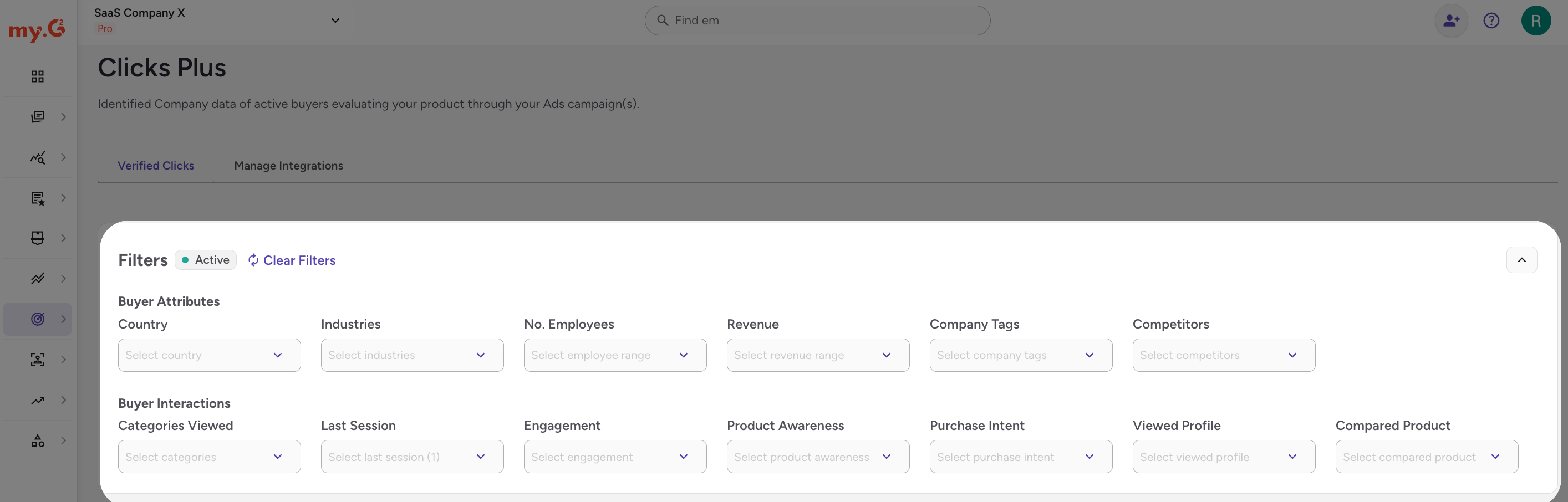
G2 Ads Clicks Plus organizes its filters into two categories:
- Buyer Attributes (firmographics): Filter by country (based on the IP address of the matched user, not the company's headquarters), industry, employee count, revenue, company tags, or competitors to help determine ICP fit.
- Buyer Interactions (session details and intent signals): Filter by categories viewed, viewed profile, last session, or compared product to see how a company engaged with your G2 presence.
Use the intent signal filters in Buyer Interactions to prioritize prospects:
| Signal | Definition | Values |
|---|---|---|
| Engagement | How active the company has been on pages relevant to your product across G2's network. | Very Low to Very High |
| Product Awareness | How familiar the company is with your product and category, based on recent activity. | High |
| Purchase Intent | The likelihood that the company will become a qualified lead and make a purchasing decision soon. | Low to Very High |
Understanding intent, engagement, and awareness filters
G2 Ads Clicks Plus scores every identified company across three dimensions to help you prioritize outreach and understand buyer behavior: Purchase Intent, Engagement, and Product Awareness. Here's what each one means.
Purchase Intent
Purchase Intent reflects how likely a company is to be actively evaluating software in your category. It's based on behavioral signals observed across G2's network over the last 30 days, including how frequently a company visited, what pages they viewed, and how they interacted with product listings.
Higher levels mean stronger buying signals, so prioritize Very High and High accounts.
Engagement
Engagement measures how actively a company has been browsing across G2, Capterra, GetApp, and Software Advice over the last 60 days. Engagement levels are normalized by company size, so a small company and a large enterprise are held to different activity thresholds.
Higher levels mean the company has visited G2's network more frequently and recently.
Product Awareness
Product Awareness reflects how much a specific company has interacted with your product listing, including profile views, product comparisons, and click-outs to your website.
A High level means the company has viewed your profile, compared your product to others, or clicked through to your site.
Because G2 Ads Clicks Plus only tracks companies that have already clicked through to your website, High is the only Product Awareness value available in your G2 Ads Clicks Plus feed.
Prioritize your outreach
Use Purchase Intent and Engagement together to decide which accounts to act on first. Companies with Very High or High scores across both dimensions are the most likely to be in an active buying cycle and represent your best opportunity for timely outreach.
Manage the Verified Clicks table
The Verified Clicks table lists companies interacting with your G2 Ads Clicks campaigns. A new click can take a couple of days to appear as a company record.
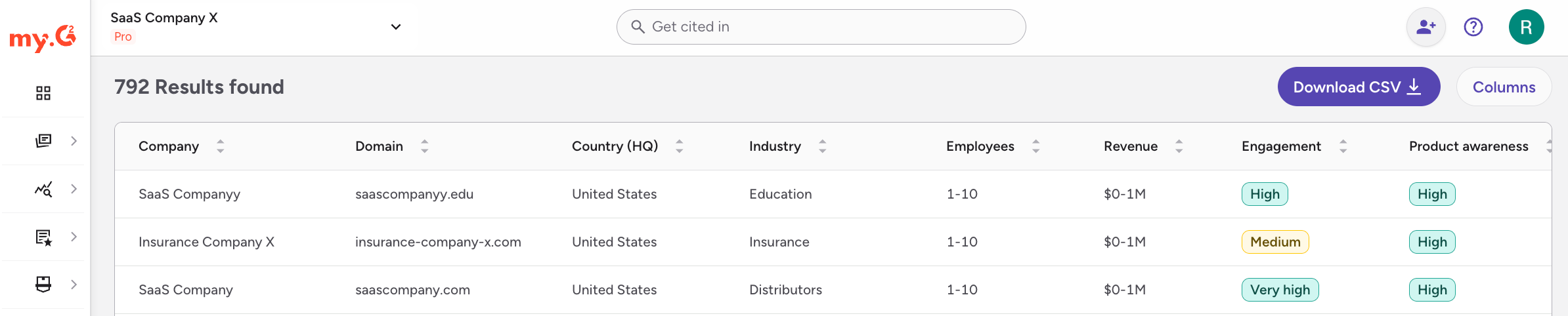
- Select Columns to customize which data points are displayed.
- Select Download CSV to export your filtered list for sales follow-up or internal reporting.
- The table shows companies that interacted with your G2 Ads Clicks calls-to-action in the last 60 days. Data doesn't go back further than 60 days, but you can use the Last Session filter to narrow the range.
Connect your integrations
From the Manage Integrations tab, you can connect G2 Ads Clicks Plus to the tools your team already uses, including LinkedIn (to build Matched Audiences from identified companies) and Salesforce (to sync verified account activity and intent signals to your CRM).
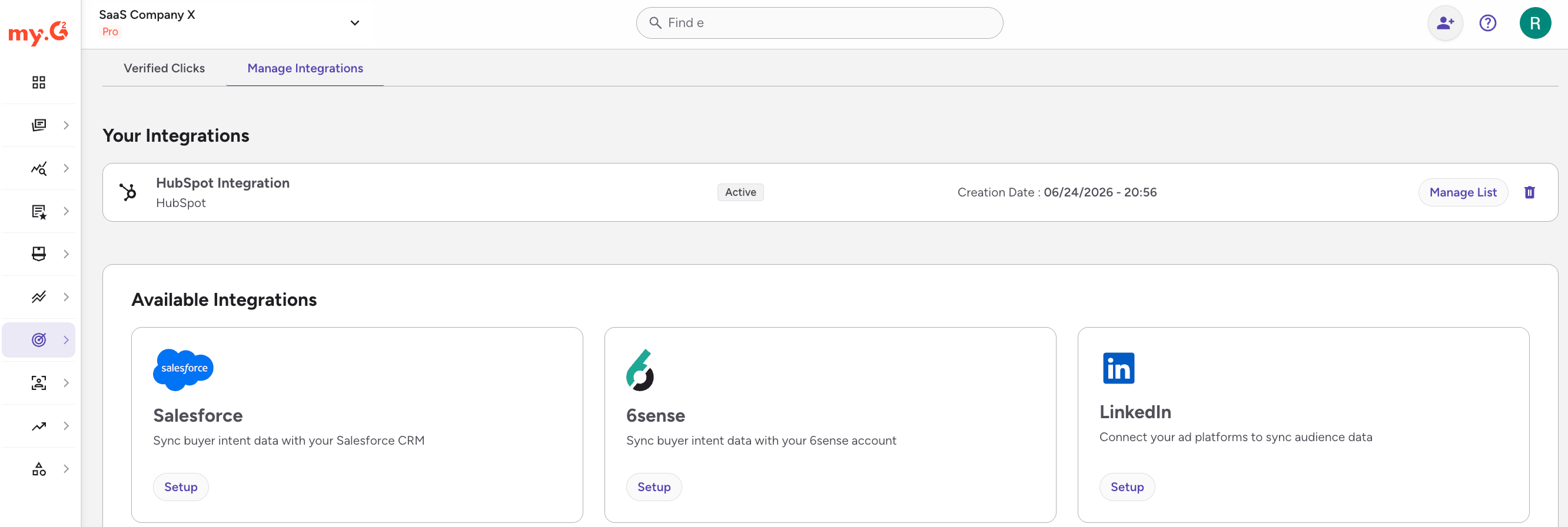
Refer to G2's LinkedIn integration guide and Salesforce integration guide for setup steps.