This article explains what G2 reads from your HubSpot or Salesforce account when you connect it to the ROI dashboard, how G2 protects that data, how long G2 keeps it, and how to disconnect.
To open the dashboard, go to my.G2, then select Insights > Impact on your Pipeline. For an overview of the dashboard, see Performance Analytics.
This article covers the Impact on your Pipeline ROI dashboard for HubSpot and Salesforce, including both Salesforce connection options. It doesn't cover CSV upload, Buyer Intent write-back integrations (except where they share the HubSpot authorization), or CRM-powered review collection.
At a glance
For the ROI dashboard, G2 reads deal and account data from your CRM, never writes to it, and refreshes the data weekly.
| Feature | HubSpot | Salesforce |
|---|---|---|
| How you connect | OAuth through the G2 app | OAuth 2.0 with PKCE, through the G2 connector package or directly from the Impact on your Pipeline page |
| Who can authorize | A HubSpot admin with access to Deals | A System Administrator or the Integration User, with field-level read access to the required fields |
| Objects G2 reads | Deals and associated Companies | Opportunities and Accounts. Opportunity Line Items only if you use Products |
| What G2 changes in your CRM | Nothing | Nothing |
| Password stored | No | No |
| Look-back window | 12 months | 12 months of Opportunities |
| First data appears | Within a few hours (typically 4 to 6) | Within 1 to 2 hours, and up to 24 hours in some cases |
| Refresh | Weekly | Weekly |
| Stop G2 from reading your data | Turn off the Allow G2 to pull deals data to enable Performance Analytics slider, select Remove Authentication, or revoke the app in HubSpot | Select Remove Authentication, ask Support to disable ROI in Salesforce App Configuration (connector package only), or revoke the connected app in Salesforce |
| Delete data G2 already stores | Contact Support. G2 deletes the data within 15 days | Contact Support. G2 deletes the data within 15 days |
How the connection works
G2 connects to your CRM with OAuth, reads the fields listed in this article on a schedule, and stores them in an encrypted database to calculate your dashboard. For the ROI dashboard, data moves in one direction.
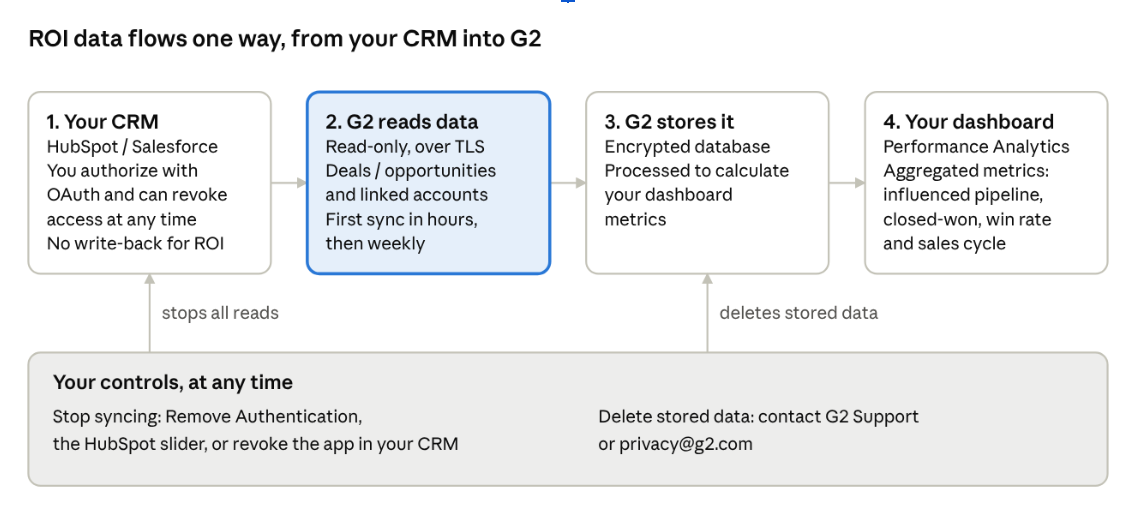
G2 touches your CRM at only one step, and that step is read-only. The remaining steps happen inside G2. You have two independent controls. Removing the connection stops new reads, and a deletion request removes the data G2 already holds.
HubSpot
For the ROI dashboard, G2 reads deals and their associated companies from HubSpot. G2 doesn't create, edit, or delete anything in your HubSpot account for ROI.
Authorization and permissions
You connect through the G2 app with OAuth. The person who authorizes must be a HubSpot admin with access to Deals, and your team must use Deals. G2 reads nothing else for ROI.
HubSpot shows one permissions screen for the whole G2 app, and you can't remove individual scopes. The permissions include write scopes that the ROI dashboard doesn't use. G2 uses them for Buyer Intent features, such as creating companies when Allow G2 to automatically create company accounts in Hubspot upon buyer intent matches? is on.
| Scope | What G2 uses it for | Needed for ROI |
|---|---|---|
| oauth | Authentication | Yes |
| crm.objects.deals.read | Read deals and deal stages | Yes |
| crm.objects.companies.read | Read the company on each deal and the history of G2's own buyer intent property | Yes |
| crm.objects.companies.write, crm.schemas.companies.read, crm.schemas.companies.write | Create and update companies and G2 properties, and push Buyer Intent timeline events | No |
| crm.objects.contacts.read, crm.objects.contacts.write, crm.schemas.contacts.read, crm.schemas.contacts.write | Look up Buyer Intent contacts and create or update leads | No |
Data G2 reads
Deal properties
| HubSpot property | What it is |
|---|---|
| amount | Deal value. You can map this to a custom field with Settings > Set Field Mapping |
| dealstage | Deal stage ID |
| hs_deal_stage_probability | Win probability |
| createdate | Created date |
| closedate | Close date |
| hs_lastmodifieddate | Last modified date |
| deal_currency_code | Currency format, such as USD or INR |
| dealname | Deal name |
| pipeline, dealtype | Pipeline ID and deal type |
| num_associated_contacts | Count of contacts, not the contacts themselves |
| notes_last_updated, notes_next_activity_date | Dates only, with no note text |
| engagements_last_meeting_booked, engagements_last_meeting_booked_source | Last meeting date and source |
Company properties (the company associated with each deal)
| HubSpot property | What it is |
|---|---|
| name | Company name |
| domain | Company domain |
| sourced_by | Company source |
| g2_buyer_intent_details | G2's own data, which G2 wrote to HubSpot earlier, and its change history |
When G2 reads data
- First sync: Starts when you authorize. Data appears within a few hours, typically 4 to 6.
- Ongoing: A weekly job refreshes the data. The dashboard reflects the most recent weekly sync, not real-time data.
- Look-back window: 12 months.
Your controls
- Turn off the Allow G2 to pull deals data to enable Performance Analytics slider on the HubSpot integration tile in my.G2.
- On the HubSpot tab of the Impact on your Pipeline page, select Settings > Remove Authentication. This stops syncing and removes CRM-based ROI reporting from your dashboard.
- Revoke the G2 app from HubSpot's connected apps page.
- Use Settings > Set Field Mapping to choose the deal value field, and use Settings > Hide Outlier Data to exclude deals. These settings change what the dashboard shows, not what G2 reads.
Salesforce
For the ROI dashboard, G2 reads Opportunities and Accounts from Salesforce with read-only access. G2 doesn't create, update, or delete Salesforce records.
Connection options
| Option | Connector package | Direct from Impact on your Pipeline |
|---|---|---|
| Best for | Buyer Intent customers who installed the G2 CRM connector | Customers without the package, including Core and Core+ |
| Who authorizes | A Salesforce Integration User or System Administrator | A Salesforce System Administrator |
| Setup | Turn on ROI in Salesforce App Configuration. Dashboards then sync automatically | Select Activate with Salesforce on the Impact on your Pipeline page and sign in. Setup is self-serve |
| To stop | Ask Support to clear ROI Enabled | On the Salesforce tab of the Impact on your Pipeline page, select the gear icon > Remove Authentication |
With either option, you can also revoke access from Connected Apps in Salesforce. Both options use OAuth 2.0 with PKCE. G2 never receives or stores your Salesforce username or password, and G2 keeps access tokens encrypted in a secrets store.
Required permissions
- Object access (Read): Opportunity and Account.
- Optional: OpportunityLineItem (TotalPrice) if you use Products, and Opportunity.CurrencyIsoCode in multi-currency orgs.
- Field-level security: Set field-level security on the authorizing user's Profile, not only on a Permission Set. If any required field is hidden, the sync fails. On the Salesforce tab of the Impact on your Pipeline page, select the gear icon > Test Connection to see which fields G2 can access and how to fix the rest.
Data G2 reads
Opportunity
| Group | Fields |
|---|---|
| Identity | Id, Name, AccountId |
| Stage and outcome | StageName, Probability, IsClosed, IsWon, ForecastCategory, ForecastCategoryName |
| Dates | CreatedDate, CloseDate, LastModifiedDate, LastActivityDate |
| Value | Amount or the custom field you map, CurrencyIsoCode (multi-currency orgs), OpportunityLineItem.TotalPrice (if you use Products) |
| Fiscal period | FiscalYear, FiscalQuarter, Fiscal, which Salesforce derives from CloseDate |
| Classification | Type, LeadSource, CampaignId |
| Status flags | IsDeleted, HasOpenActivity, HasOpportunityLineItem, HasOverdueTask |
Account: Id, Name, Industry, Website, CreatedDate, LastModifiedDate, LastActivityDate.
G2 doesn't read Contacts, Leads, Users, or other objects for the ROI dashboard.
When G2 reads data
- First sync: Starts when you authorize. The dashboard is ready within 1 to 2 hours.
- Ongoing: Weekly.
- Look-back window: The past 12 months of Opportunities, matched with the past 12 months of G2 buyer activity.
- Network: G2 reads from Salesforce only from published static outbound IP ranges that you can allowlist. For the current list, see the Salesforce implementation guide.
Your controls
- Use Remove Authentication, ask Support to disable ROI, or revoke access in Salesforce Connected Apps, as described in Connection options. Any of these stops future syncs immediately.
- If your company has several G2 products, you can share the connection between them. On the Salesforce tab, select the gear icon > Share CRM Access.
How G2 uses your CRM data
G2 uses your deal and account data to show how G2 activity relates to your pipeline and revenue, and for no other purpose described in this article. Your users see aggregated dashboard metrics, not a copy of your CRM. Deal amounts, stages, and dates come from your CRM, and G2 doesn't estimate them. G2 doesn't sell your CRM data.
If G2 changes how it uses CRM data, G2 updates this article.
| Use of your CRM data | Status | Details |
|---|---|---|
| Impact on your Pipeline ROI dashboard metrics, including influenced pipeline, closed-won, win rate, and sales cycle | Live | Described in this article |
| AI Insights and Recommendations summaries on the dashboard, generated from your dashboard data | Live | GPT 4.1-mini |
Security controls
G2 limits what it can do in your CRM, encrypts the data it holds, and is independently audited. For full security documentation, see the G2 Trust Center.
| Control | What G2 does |
|---|---|
| Least privilege | G2 issues only read queries against the objects listed in this article. G2 doesn't read contacts, leads, or users for Salesforce ROI. |
| Authentication | OAuth 2.0, with PKCE for Salesforce. You can revoke access at any time from G2 or from your CRM. |
| Credentials | G2 doesn't store your Salesforce username or password. G2 encrypts OAuth tokens in a secrets store. |
| Encryption in transit | HTTPS/TLS for all traffic between your CRM, G2, and your browser. |
| Encryption at rest | G2 stores CRM data in an encrypted database. |
| Network | For Salesforce, G2 reads only from published static IP ranges that you can allowlist. |
| Access inside G2 | G2 systems use raw CRM data to compute metrics. G2 doesn't show raw CRM data to your users. |
| Audit | G2 completed its most recent SOC 2 audit in January 2026. To request reports and certifications, email security@g2.com. |
| Subprocessors | G2 maintains its subprocessor list at legal.g2.com/subprocessors. |
| Incident notice | The Data Processing Addendum commits G2 to notify you without delay after confirming a personal data breach. |
Data retention and deletion
Disconnecting stops all further reading immediately. Deleting the data G2 already holds is a separate request that G2 completes within 15 days.
| Data | Where G2 holds it | How long | When G2 deletes it |
|---|---|---|---|
| Deal, opportunity, and account fields listed in this article | G2 application database | While you're connected, refreshed weekly | Within 15 days of your deletion request or of disconnecting |
| OAuth tokens | Encrypted secrets store | Until you remove or revoke the connection | When you select Remove Authentication |
Disconnect and delete your data
- Stop syncing: Select Remove Authentication, turn off the HubSpot slider, or revoke the app in your CRM.
- Delete stored data: Open a request with G2 Support, or email privacy@g2.com. G2 starts a formal deletion process and confirms when it's complete.
- Records you delete in your CRM: Deleting a record in your CRM doesn't delete G2's copy. If you remove a record for privacy reasons, include it in your deletion request.
If you need G2 to honor a Data Subject Access Request (DSAR) for data in your CRM, send the request to G2 separately. G2 doesn't act on CRM deletions automatically.
Privacy and legal terms
Your CRM data is governed by your agreement with G2 and by the following documents:
- Master Service Agreement and Service Order
- Data Processing Addendum
- Data Transfer Addendum
- Privacy Policy and Terms of Use
- Subprocessors
- Trust Center
| Topic | Summary |
|---|---|
| Data G2 accesses | When you connect HubSpot or Salesforce, G2 reads the deal, opportunity, and account fields listed in this article. The ROI dashboard doesn't read contact names or email addresses. |
| Why G2 accesses it | To calculate and display how G2 activity relates to your pipeline and revenue, and to provide the dashboard features you enable. |
| Sharing | G2 doesn't sell your CRM data or share it for advertising. G2 uses subprocessors to host and operate the service. |
| Retention | See Data retention and deletion. |
| Your choices and rights | You can disconnect at any time and request deletion of stored CRM data. Individuals can contact G2 to exercise rights under laws such as GDPR and CCPA. |
| Security | See Security controls. |
| Contact | Email privacy@g2.com for privacy requests and security@g2.com for security questions and audit reports. |
FAQ
Does G2 change anything in my CRM?
No. For the ROI dashboard, G2 only reads deals or opportunities and their accounts. HubSpot Buyer Intent features can create companies if you turn on Allow G2 to automatically create company accounts in Hubspot upon buyer intent matches?. That setting is separate from ROI.
Why does HubSpot show create and delete permissions when I connect?
The G2 app requests one permissions bundle that also supports Buyer Intent, and HubSpot doesn't let you remove individual scopes. The ROI dashboard uses read access to deals and companies only.
Does G2 store my CRM password?
No. G2 uses OAuth, so G2 never receives your Salesforce or HubSpot password. G2 stores tokens encrypted.
Can I limit which records G2 reads?
Not today. G2 reads all deals or opportunities that the authorizing user can access, within the look-back window. To exclude records from your dashboard, use Settings > Hide Outlier Data. You can also upload a CSV of only the records you want instead of connecting your CRM.
Can other people see my raw CRM records?
No. Only admins of your G2 product in my.G2 can access CRM and ROI data. G2 staff who support your account can view the dashboard in Observer mode.
How do I stop G2 from reading my data?
Select Remove Authentication on the Impact on your Pipeline page, turn off the Allow G2 to pull deals data slider in HubSpot, or revoke the app in your CRM. Syncing stops immediately.
How do I delete the data G2 already holds?
Contact G2 Support. G2 deletes stored CRM data within 15 days after deactivation or churn.
Is my data used to train AI models or shared with other companies?
G2 doesn't use CRM data for any AI model training. G2 does send the data to large language models (LLMs) to generate AI summaries.
Is G2 SOC 2 certified?
G2 completed its most recent SOC 2 audit in January 2026. To request reports, email security@g2.com or visit the Trust Center.
Can I allowlist G2's IP addresses?
Yes, for Salesforce. G2 reads only from published static outbound IP ranges. For the current list, see the Salesforce implementation guide.
I connected, but the dashboard is blank. Is it a permissions problem?
Usually, yes. Wait 4 to 6 hours first. In Salesforce, set field-level security on the authorizing user's Profile, and use Test Connection to see which fields are blocked. In HubSpot, the user must be an admin and must use Deals.